For Logic Pro · macOS · offline
JBT Logic Launcher
Song in. Project ready.
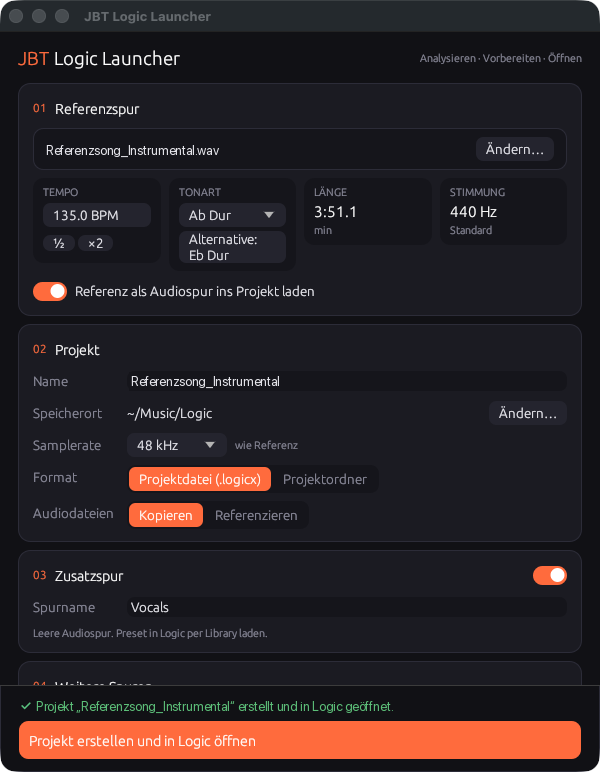
Drag a reference song into the window. The Launcher detects tempo, tempo changes, key and tuning and writes a ready-made Logic Pro project from it, with every stem on its own track. It writes the .logicx file itself, without remote-controlling Logic, and then simply opens the project.
Planned price after the free beta: single licence €19 at launch (€29 after that), Studio €79, Education €15.
How it works
1 · Drag in a song
WAV, AIFF, MP3, M4A or FLAC. A whole folder of stems works too, up to 250 tracks.
2 · Check the values
Tempo, tempo changes, key with alternative and tuning appear right away. Every value can be changed before creating the project.
3 · Continue in Logic
The Launcher writes the .logicx file and opens it. Grid, key, sample rate and tracks are already set.
Features
Tempo
The project tempo comes from the analysis. Switch to half or double tempo with one click.
Tempo changes
If the song changes tempo, the changes land as tempo events in the tempo track, snapped to the nearest bar or beat.
Key with alternative
The project key is set. The relative key is shown next to it in case the song is ambiguous.
Tuning
If the song is off 440 Hz, the Launcher shows the deviation in cents so instruments and vocals match.
1–250 tracks from stems
Each stem gets its own audio track with name and colour, at bar 1. Plus an empty vocal track if you want one.
Sample rate and format
Projects run at 48 kHz; high-resolution material from 88.2 kHz keeps its rate. The Launcher converts files with a different rate or in MP3, M4A and FLAC as needed.
Offline, no account
The app sends nothing. It needs neither internet nor accessibility permissions and does not remote-control Logic.
Project end and marker
The project ends shortly after the song. A marker shows where the reference stops.
System requirements
- Mac
- Apple chip (M1 or later), no Intel
- System
- macOS 13 Ventura or later
- Logic
- Logic Pro 13 (tested with 13.x)
- Time signature
- 4/4
- Tracks
- 1 to 250 plus vocal track
- Size
- 3.6 MB
- Internet
- not required
FAQ
Do I need my own Logic template?
No. The Launcher brings its own base project and creates any number of tracks itself. You do not need to prepare anything in Logic.
How accurate is the detection?
For songs with a fixed tempo, the tempo is usually exact. Tempo changes are found to within about a third of a second and snapped to the bar. Gradual tempo changes (ritardando) are created as steps. The key can be off for ambiguous songs, which is why the alternative is shown next to it. Every value can be changed before creating the project.
Does the app remote-control Logic or need special permissions?
No. It writes the project file itself and only opens it. It needs no accessibility or automation permissions.
Will it still work after a Logic update?
Logic Pro 13 is tested. If Apple changes the project format, an update will follow.
Is the Launcher available for Windows or other DAWs?
No. Logic Pro is only available for the Mac, and the Launcher writes exactly its project format.
Are my songs uploaded anywhere?
No. Analysis and project are created on your Mac. The app does not connect to the internet.